
Core concepts
LYBO Harness — one agent, many places
Run each task on the device first, and hand it to your desktop, a Windows 365 / WorkSpaces desktop or a cloud runtime only when it needs to — with a small, redacted memory capsule and one trace.
The Edge Runtime is the agent on one machine. The LYBO Harness is the framework around it that lets the same agent work across every place you have: the device in your hand first, then — only when a task needs it — your own desktop, a hosted desktop (Windows 365, Azure Virtual Desktop, AWS WorkSpaces, a GCP VM) or a LYBO cloud runtime. The runtime on each node, the harness joining them and the plane behind them together make up LYBO OS.
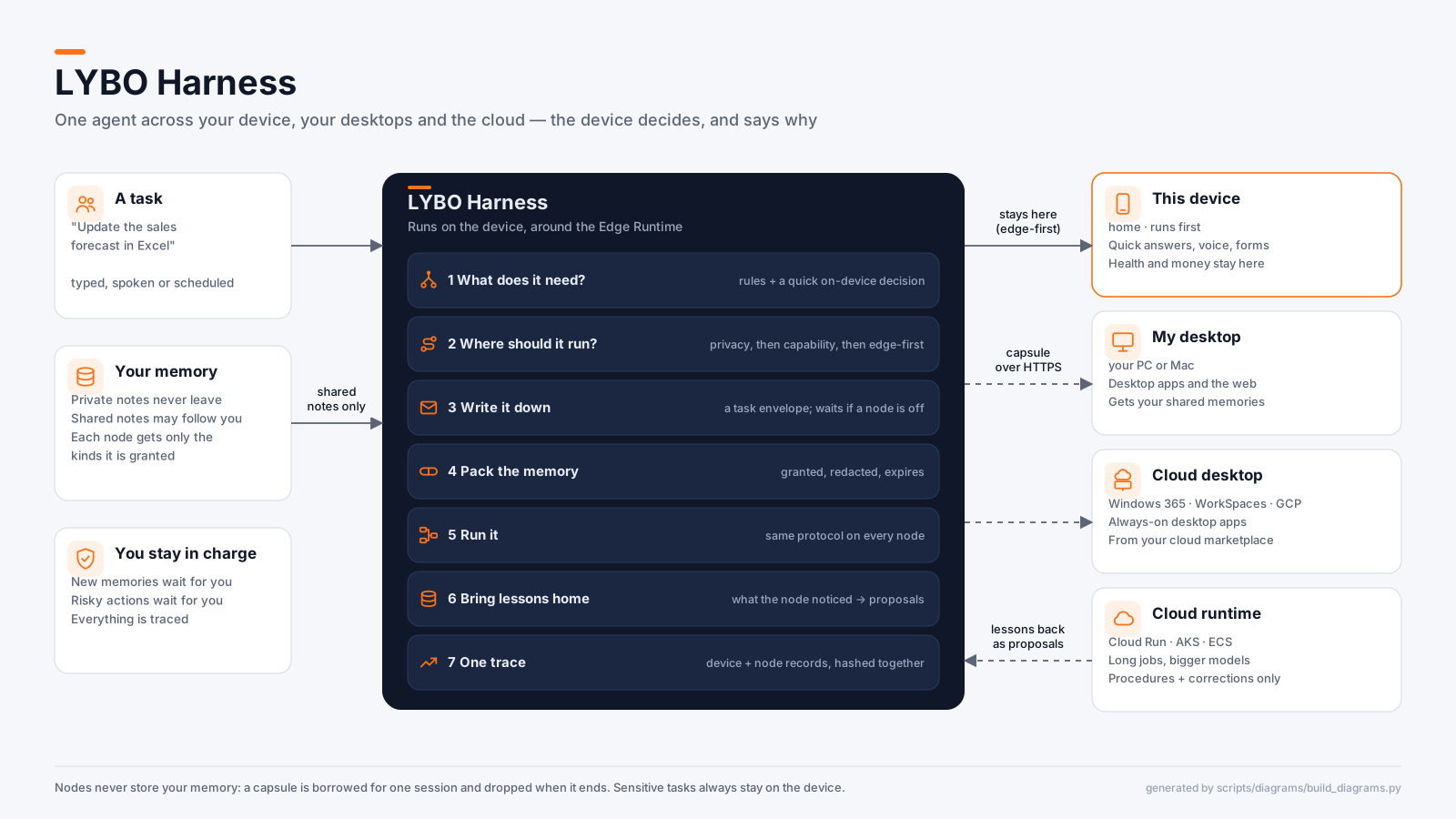
How a task moves
- 1
What does it need?
Keyword rules always run on the device. When the device has a scorer, a quick typed decision (
decide, tierlocal) adds what the rules missed — desktop app, web, how much work, how sensitive. It can add a need or raise sensitivity, never lower it. - 2
Where should it run?
Privacy first (a
local_onlydevice never hands off; health, money and credentials stay home; personal data only goes to your own nodes), then capability (desktop apps, browser, GPU, context size), then an edge-first score. Every node that wasn't chosen is listed with the reason. - 3
Write it down
The task becomes a durable envelope on the device. If the only capable node is offline it parks and runs on the next
run_pending— the phone can hand off a long job and sleep. - 4
Pack the memory
A handover capsule carries only memories you let follow you, only the kinds that node is granted, with personal details removed (the task text too). It expires and is digest-signed.
- 5
Run it
Every node speaks the same LYBO protocol the SDKs use — in process, or over HTTPS to
lybo serve --http. - 6
Bring lessons home
What the node noticed comes back as proposals waiting for your approval. The node keeps nothing: the capsule is borrowed for one session.
- 7
One trace
The device's placement, the node's run (with its own audit-chain hash) and the memory return are stitched into one tamper-evident record.
Nodes
| Kind | Typical | Gets by default |
|---|---|---|
device | Phone, tablet, laptop — always tried first | everything (it's already here) |
desktop | Your PC or Mac | memories you shared + the thread summary |
cloud_desktop | Windows 365 · Azure Virtual Desktop · AWS WorkSpaces · GCP VM | same as desktop |
cloud_runtime | LYBO runtime on Cloud Run, AKS or ECS | procedures and corrections only |
Try it
lybo harness demo
# on the node (your PC, a Cloud PC, a cloud runtime)
LYBO_SERVE_TOKEN=… lybo serve --http --bind 0.0.0.0 --port 8790

# on the device / your laptop
lybo harness plan "Update the forecast in Excel" --node pc=desktop@http://192.168.1.20:8790
LYBO_NODE_TOKEN=… lybo harness run "Research our competitors in depth" \
  --node cloud=cloud@https://lybo.example.run.app
let mut h = Harness::new(device_rt.clone(), NodeCard::device("phone", "android", 4096), store);
h.add_node(Box::new(InProcessNode::new(NodeCard::own_desktop("pc", "windows"), pc_rt)));
h.add_node(Box::new(ProtocolNode::new(NodeCard::cloud_runtime("cloud", "azure"), transport)));

let env = h.dispatch("Update the sales forecast in Excel", None)?;  // runs now
let id  = h.submit("Monitor competitor prices overnight", None)?;  // later
h.run_pending()?;eval::check_placement) — "this task should land there" cases, checked without running anything — and eval::run_on_nodes to compare nodes on the same eval suite.